Stop Guessing. Know Your Profit.

WorkBenchy calculates your cost per print — filament, labour, packaging, and your electricity rate — and shows your real margin on every order. Free to start.

No credit card requiredCancel any timeFree plan forever

100+ orders tracked

workbenchy.app/dashboard/today

Morning briefing

Today

9 items to look at
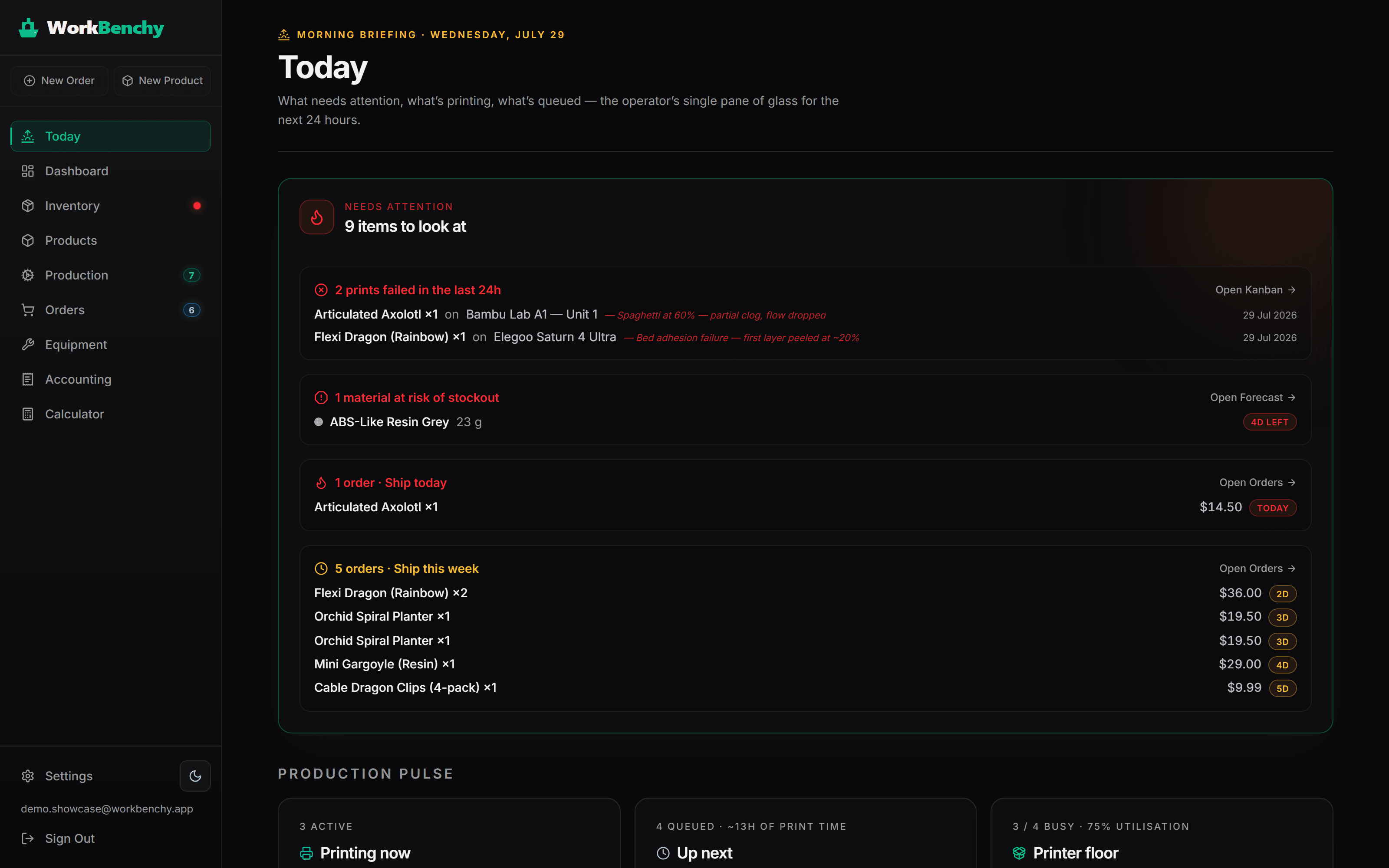
2 prints failed in the last 24hArticulated Axolotl ×1 · Bambu Lab A1 — spaghetti at 60%Open Kanban
1 order · Ship todayArticulated Axolotl ×1 · $14.50Today
1 material at risk of stockoutABS-Like Resin Grey · 23 g left4D LEFT

The real Today page, doing this for your farm every morning.

See your profit before you hit Save

Every field you fill in updates the receipt in real time. No formulas, no manual recalculation — WorkBenchy does the maths as you type.

Flexi Dragon

PLA · 120 g · 7 hr print

$
$
$
Auto-calculated from BOM: material $2.40 · electricity $0.35 · labour $2.50 · packaging $0.80
Live Receipt
Live
Sale price$18.00
Shipping revenue(from buyer)$4.50
Revenue$22.50
BOM cost(materials + labour)−$6.05
Platform fee−$1.80
Shipping cost(passes through at cost)−$4.50
Net Profit+$10.15
Margin45.1%

WorkBenchy shows this for every order you log — try it free

In the real app — costs pull from your live inventory, BOM recipes, and actual spool prices.

Open the real thing

This is what running your farm on WorkBenchy looks like

Real screens, real workflow — from the morning briefing to the evening pricing call.

8:00 — Morning briefing

Start the day already knowing what matters

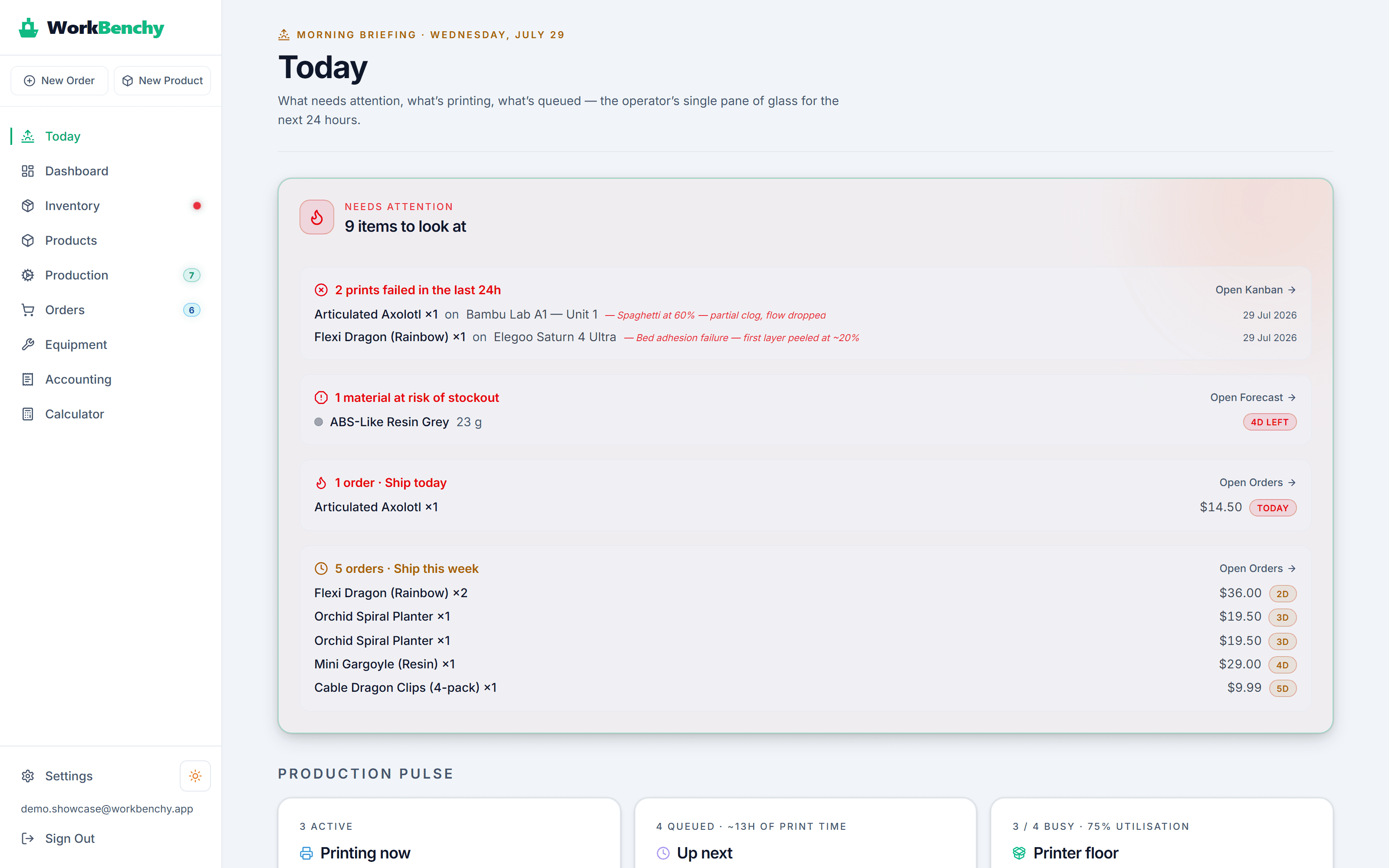
The Today page is your single pane of glass: which orders ship today, which prints failed overnight and why, and which spool will run out first — before you've had coffee.

  • Ship-by deadlines bucketed into today / tomorrow / this week
  • Failed prints from the last 24h with the failure reason
  • Materials at risk of stockout, flagged days in advance
WorkBenchy Today page with deadline buckets, failure feed and stockout warnings

9:30 — On the floor

Run the print floor from one Kanban

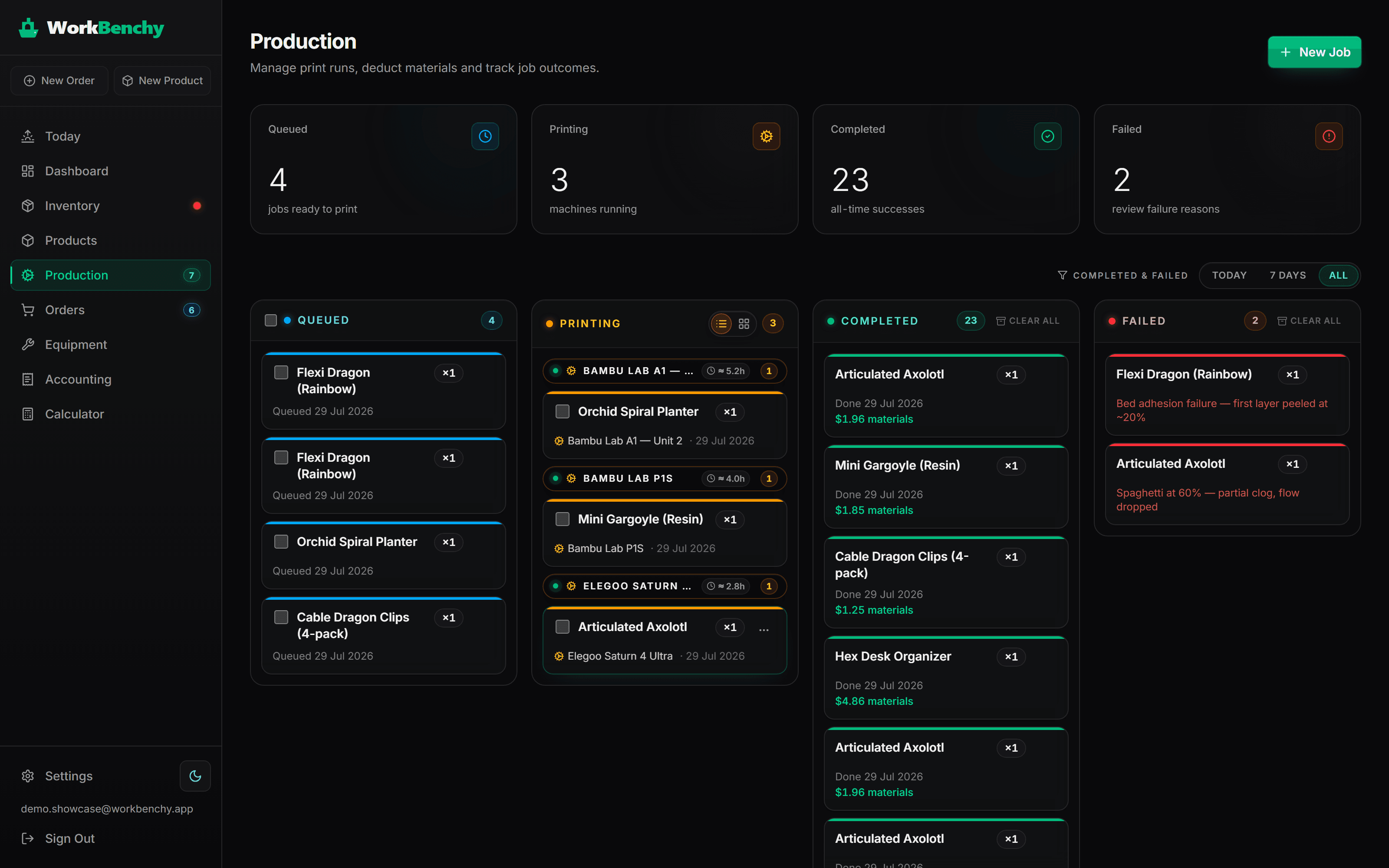
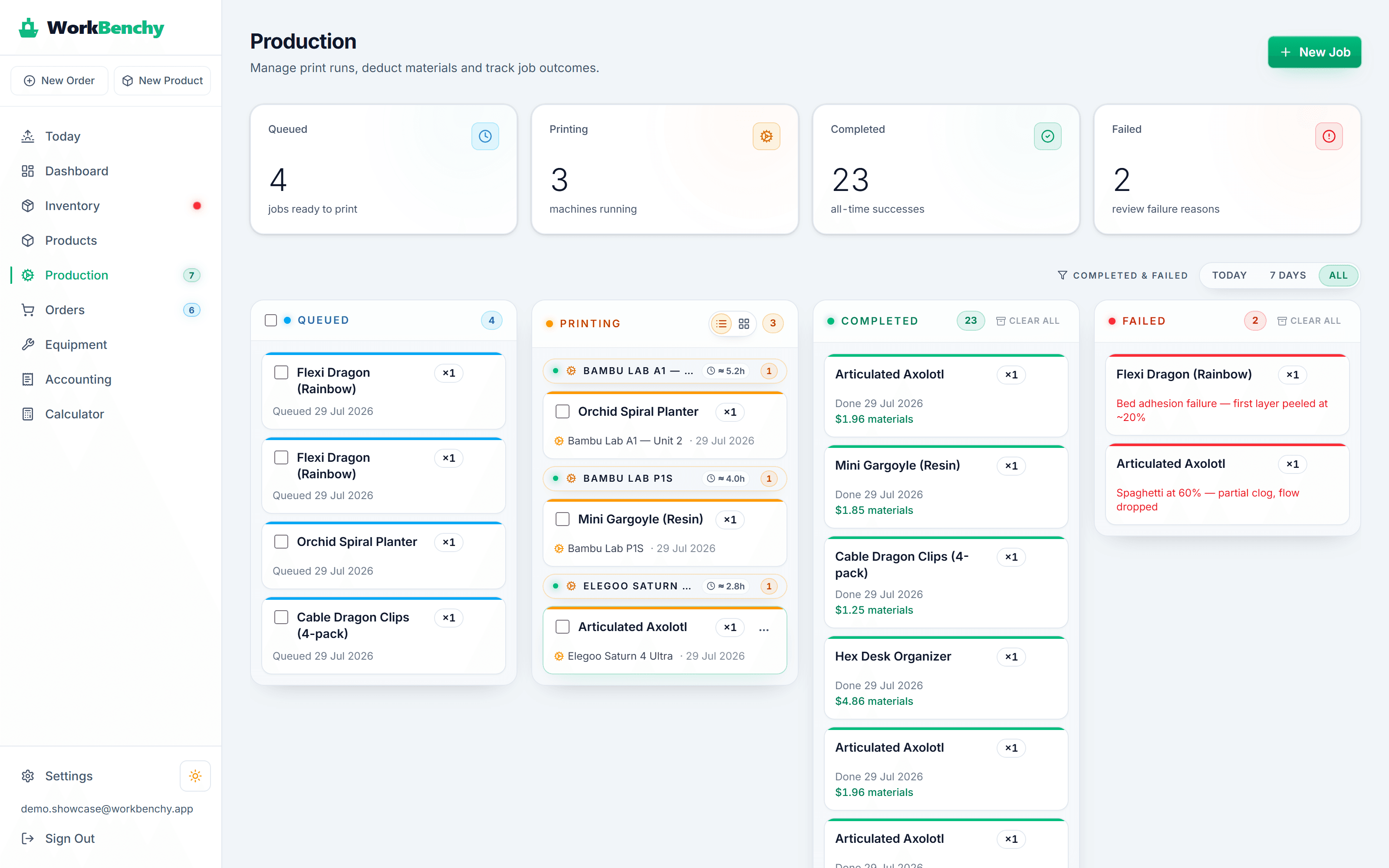
Every order automatically becomes print jobs — one card per unit. Drag from queued to printing to done; failures record a reason and return unused material to stock, correctly priced.

  • Jobs auto-generated from every order
  • Per-printer assignment and status columns
  • Failures log a reason and scrap-return material at FIFO cost
WorkBenchy production Kanban with queued, printing, completed and failed columns

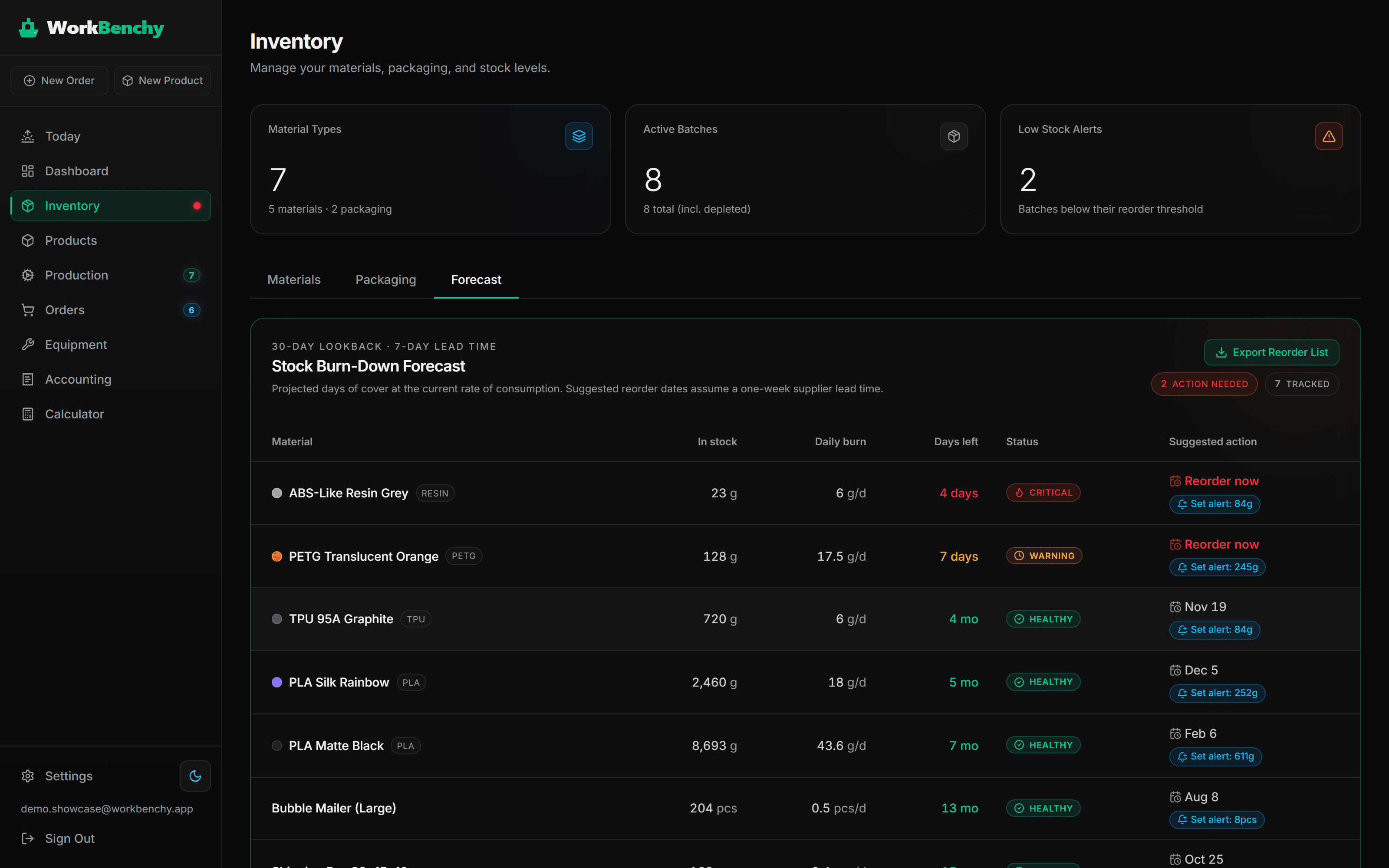
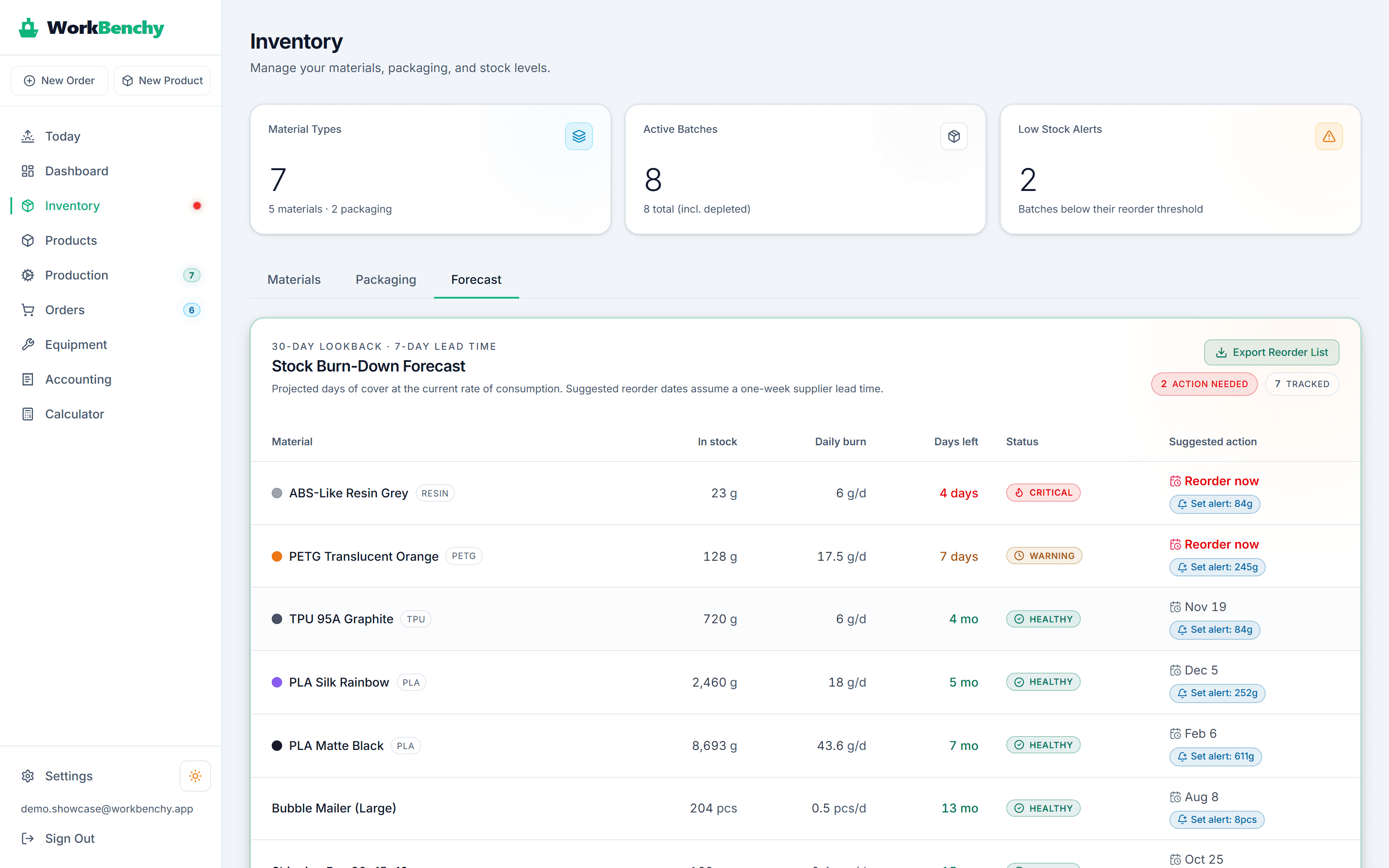
14:00 — Restock check

Never run out of filament mid-print

WorkBenchy watches your real consumption and projects how many days each material has left. Critical spools surface on the dashboard, and the reorder list exports to CSV.

  • Burn-down forecast per material from actual usage
  • One-click alert thresholds at the suggested level
  • Export a ready-to-send reorder list
WorkBenchy stock burn-down forecast with critical and warning materials

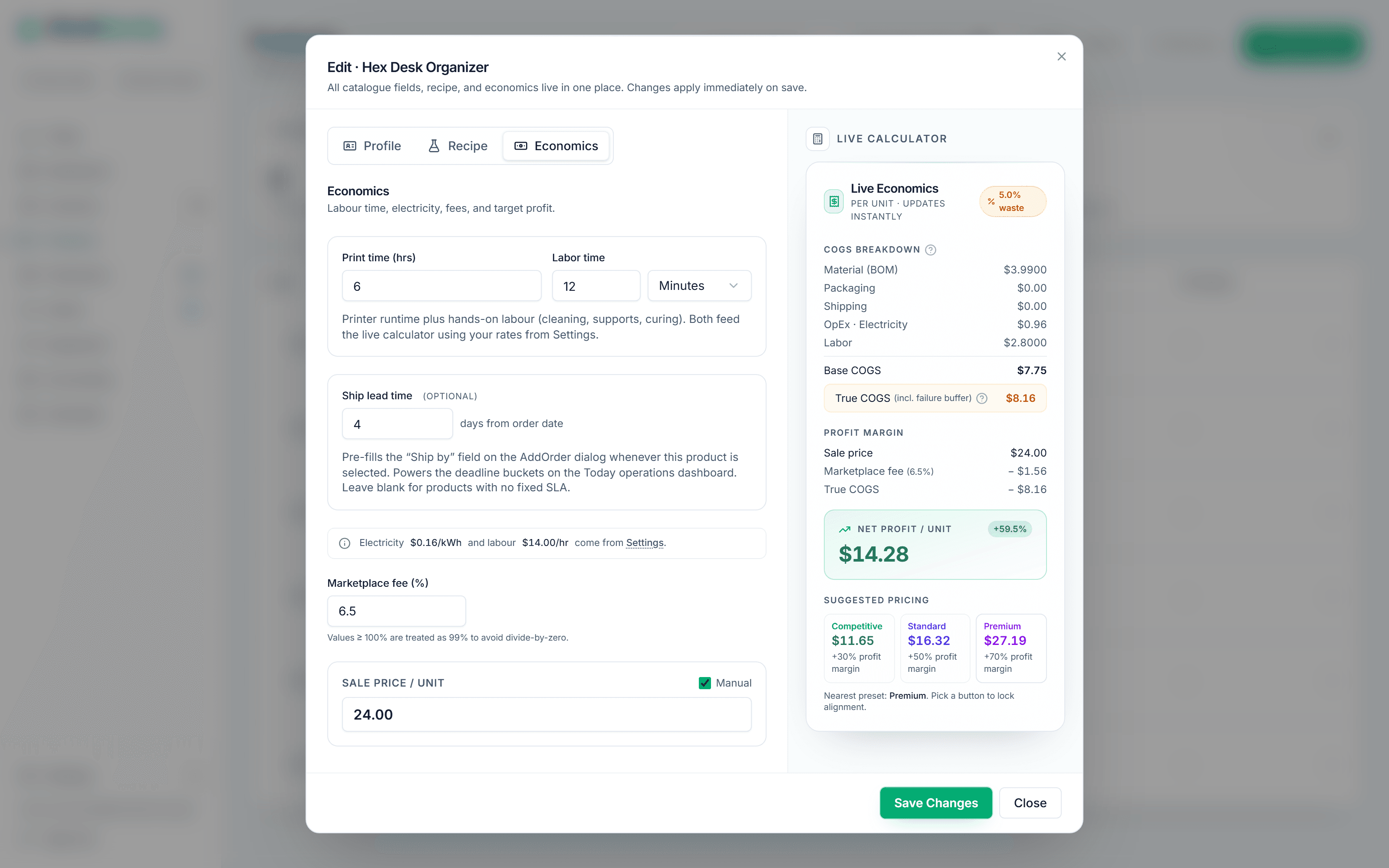
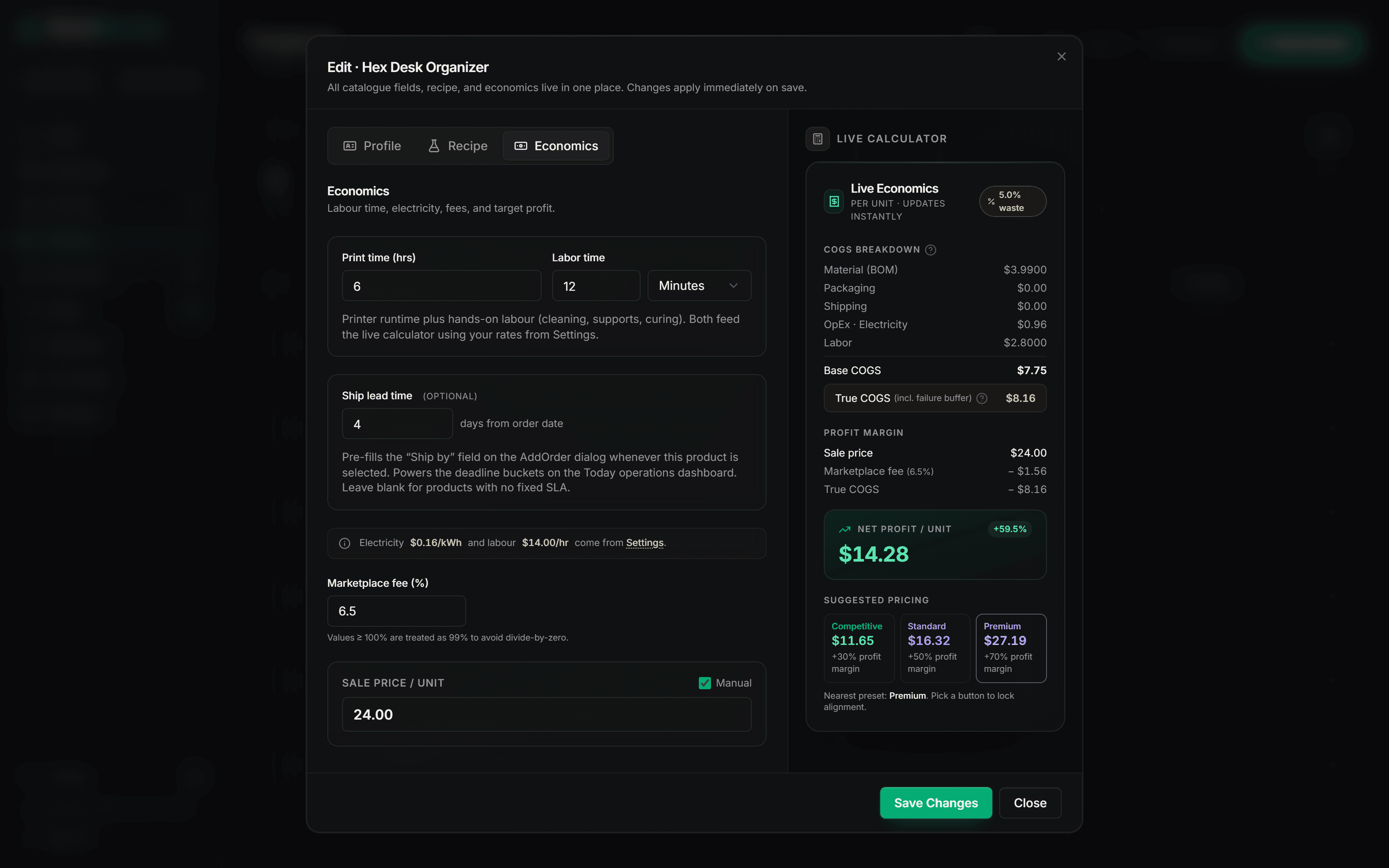
18:00 — Pricing call

Price with true COGS, not a guess

Material from your real stock prices, electricity, labour, packaging, and a failure-rate buffer — the live calculator shows net profit per unit and suggests price points as you type.

  • True COGS including a failure-rate buffer
  • Net profit per unit and margin, live
  • Suggested competitive / standard / premium pricing
WorkBenchy product economics with true COGS breakdown and suggested pricing

Up and running in under 5 minutes

No complicated setup. No spreadsheets. Just log in, add your materials, and start knowing your real margins.

Add your materials & printers

Spools, electricity rate, hourly labour — guided, about two minutes.

Build your product recipes

Grams, print time, failure rate — your cost per unit appears instantly.

Track orders & see real profit

Etsy sync, CSV import or manual — margin on every order, automatically.

Everything you need to run a profitable print farm

Six integrated modules — from per-spool cost tracking to visual Kanban boards — all in one clean, fast interface.

Smart Profit Calculator

Real-time profit margins with exact spool deduction. Know your true cost before you quote — every single time.
Live COGS breakdown with net profit per unit
  • Material, electricity & labour costs
  • Failure-rate buffer built into COGS
  • Live margin receipt as you type

Inventory & Orders Hub

Track spools and packaging, fulfil orders seamlessly. Stock levels update automatically on every sale.
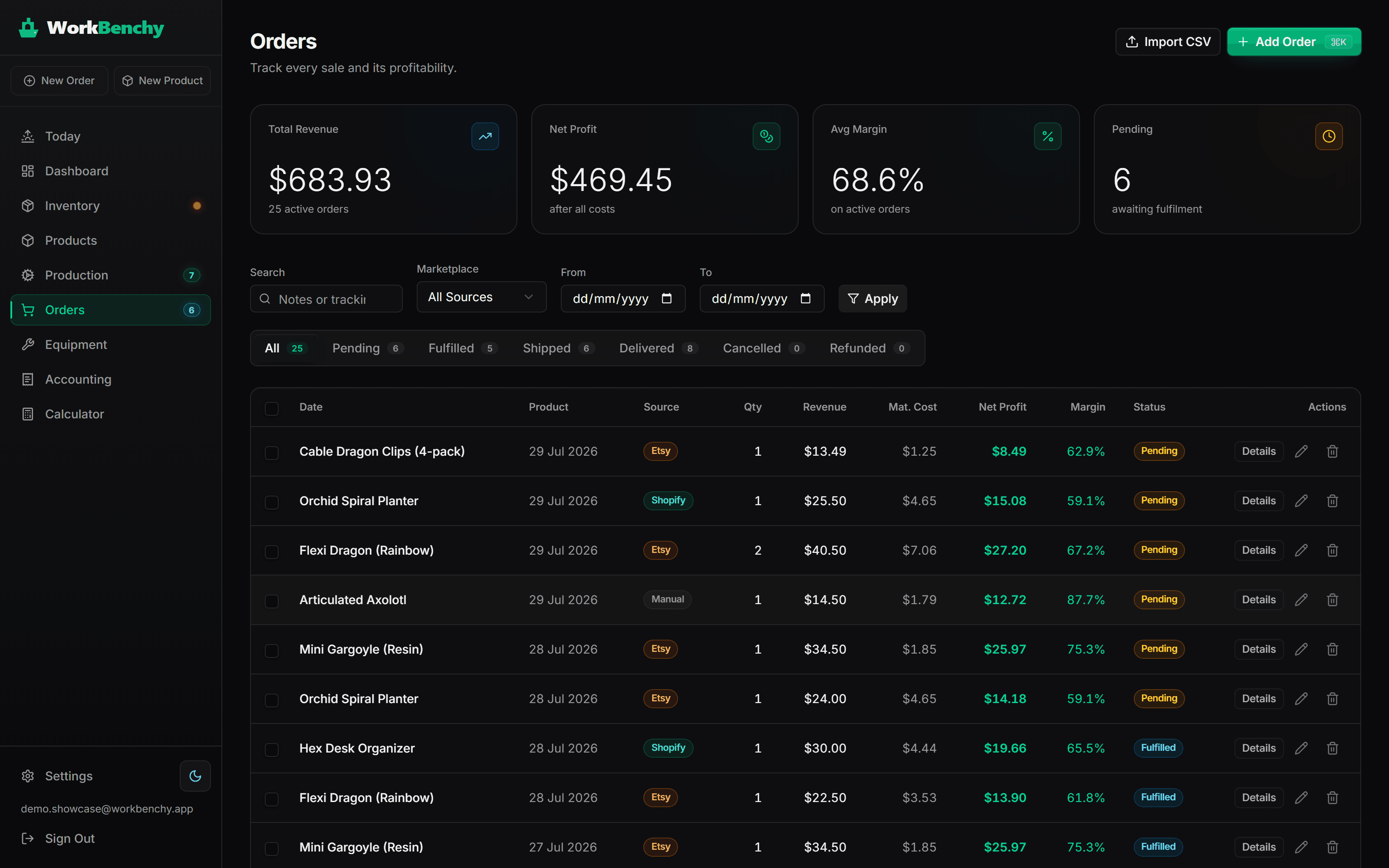
Orders table with ship-by deadlines
  • Low-stock alerts per material
  • Multi-marketplace order logging
  • Automatic FIFO deduction on fulfilment

Production Kanban

Visual board that moves print jobs from queued to printing to fulfilled — in real time.

Kanban columns with print jobs
  • Jobs auto-generated from orders
  • Per-printer status columns
  • One-click fulfilment & dispatch

Built specifically for how print farms actually operate

Most tools are built for factories. WorkBenchy is designed around the real workflow of 3D printing: spools, print times, failure rates, and marketplace fulfilment — Etsy sync built in, CSV import for eBay and everywhere else.

  • Real-time margin receipt as you type
  • Per-spool consumption auto-deducted
  • Row Level Security — your data, only yours
Materials LibraryEquipment ManagementProfit CalculatorOrder FulfilmentWarehouse InventoryVisual Kanban Board

Still tracking profit in a spreadsheet?

Excel works — until your spool runs out mid-order and you only notice three weeks later. WorkBenchy is built for the reality of 3D printing.

Profit per order

Excel: Manual formula — goes stale instantly

Live as you type, every field

Material cost

Excel: Guessed average price

FIFO from real stock batches

Inventory tracking

Excel: Manual columns, easy to forget

Auto-deducted on every fulfilment

Low-stock alerts

Excel: not supported

Per-material threshold alerts

Production status

Excel: not supported

Visual Kanban — queued → done

Multi-marketplace orders

Excel: Copy-paste from each platform

Log manually or via CSV — Etsy, Shopify, eBay in one place

Time per week

Excel: 2–4 hrs of manual updates

Minutes — no manual formula-updating

Electricity & labour cost

Excel: not supported

Built into every cost calculation

Already use Excel? Import your orders via CSV and keep your data.

Stop guessing. Start knowing.

Switch from spreadsheets to real-time profit tracking. Free to start — no card, no setup fees.

Simple pricing, no surprises

Start free, no card needed. Upgrade when you're ready. Cancel any time — no contracts, no lock-in.

Hobby

For enthusiasts getting started.

$0/ mo
  • 1 printer
  • Up to 4 products
  • 30 orders / month
  • Manual order entry
  • Basic inventory tracking
  • Material & filament cost calculator
  • Profit-per-order breakdown
  • Community support
Get Started for Free

Starter

For side-hustle makers growing their first farm.

$9.99/ mo
  • Everything in Hobby, plus:
  • Up to 5 printers
  • Unlimited products
  • 150 orders / month
  • CSV order import
  • Full inventory & FIFO cost history
  • BOM-based production Kanban
  • Email support
Start Starter Plan
Most popular

Pro

For growing print farms that sell across channels.

$19.99/ mo
  • Everything in Starter, plus:
  • Up to 15 printers
  • Unlimited orders
  • Low-stock smart alerts
  • True COGS analytics & dashboards
  • Equipment maintenance tracking
  • Multi-currency support
  • Priority email support
  • Etsy shop sync — orders auto-import
  • Shopify order importbeta
Upgrade to Pro

Scale

For professional studios and large operations.

$59.99/ mo
  • Everything in Pro, plus:
  • Unlimited printers
  • Unlimited orders & products
  • Dedicated onboarding session
  • Priority support (24h response)
  • Custom data export
  • Invoicing & VAT-friendly billing
  • Multi-user operator accountscoming soon
  • API & webhook accesscoming soon
Get Scale Plan

Prices in USD · taxes may apply · cancel any time, keep your data

Frequently asked questions

Do I need a credit card to start?
No. The Hobby plan is free forever — no card required. You only need to add payment details if you upgrade to a paid plan.
How does the profit calculator actually work?
You define your products with a recipe (Bill of Materials) — how many grams of filament, print time, labour. WorkBenchy pulls your material costs from your inventory and calculates your true Cost of Goods Sold in real time, including electricity rate, failure rate, and packaging.
Can I connect my Etsy or Shopify store?
Etsy: yes — connect your shop on the Pro plan and orders import automatically (with a manual re-sync button as backup). Shopify order import is in beta. eBay and everywhere else: import orders via CSV on Starter+ or add them manually on any plan.
What is FIFO inventory and why does it matter?
FIFO (First In, First Out) means when you use materials, the cost is taken from your oldest stock purchase first — just like real accounting. This gives you accurate Cost of Goods Sold for tax purposes, not just an average guess.
Can I cancel any time?
Absolutely. Cancel from your account settings with one click. You keep access until the end of your billing period, then drop to the free Hobby plan — your data stays intact.
Is my data safe?
Yes. Every account is completely isolated using Supabase Row Level Security — no other user can ever read or modify your data. We use industry-standard encryption in transit and at rest.

Still have questions? Email us — we reply within 24 hours.